/eh/2025-01-08/173633966714069467/picture.png)

/eh/2024-12-24/173503345348979036/Favorite-Icon.png)
/eh/2025-07-08/1751962110204480194/picture.png)
/eh/2025-06-21/1750485478958537574/countryInfoIcon.png)
/eh/2025-06-21/1750485741321434291/Hi-Sign-in-My-Nihao.png)
/eh/2025-06-21/1750485837193896318/cart.png)
/eh/2025-06-21/1750485968202533847/cart.png)
/eh/2025-04-17/1744862476612819675/hot-img.png)
/eh/2025-11-07/1762504524550532584/header-icon.jpg)
/eh/2025-07-07/1751875582852206790/header-icon.png)
/eh/2025-07-07/1751875587886277738/header-icon.png)

Best in 7 days


Shopping security
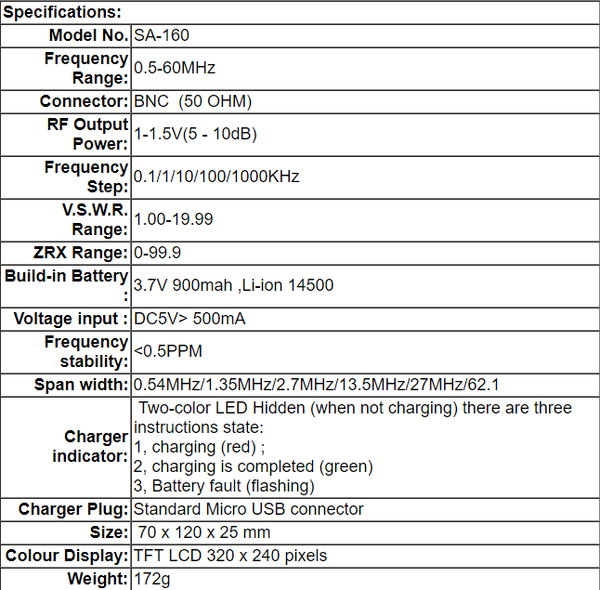
SA-160 antenna analyzer designed for testing, checking, tuning or repairing antennas and antenna feed lines.
Mainly, these are S.W.R. (Standing Wave Ratio) and impedance measurement instruments (vector impedance analyzer).
Easy-to use measurement modes. make SURECOM attractive for professionals and hobbyists. It is quite important that graphical display of various parameters over a wide frequency range is a key feature of these analyzer which significantly reduces the time required to adjust an antenna.
Main Features:
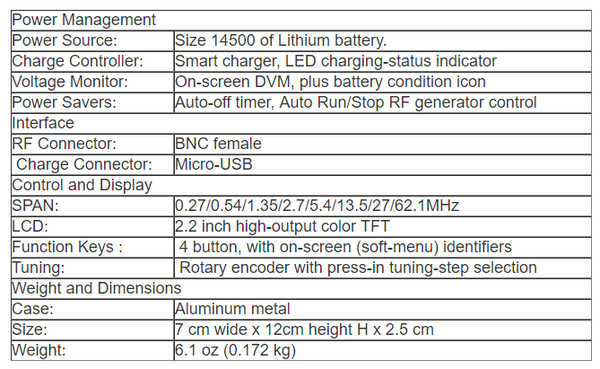
■ 2.2 ” precision LCD screen,High-lumen LCD brightness, easy to read in direct sunlight
■ Heavy duty Aluminum enclosure,strong anti-interference ability.
■ Very compact and convenient for field use
■ Built-in rechargeable Li-ion battery
■ Full Band control (No need select Band )
■ Easy setup, only four control buttons with convenient on-screen soft menus
■ Constant Battery Status Indicator and Auto Shut-off
■ Built-in timer shows elapsed time when unit is turn on
■ High efficiency IC, low power consumption, the longest working hours
■ More choice measurement frequency Span .
■ One button quick scan mode HF1,HF2,HF3 or 3 band by full screen.
■ Auto marker the Best s.w.r. level reference
Turn on and off the power
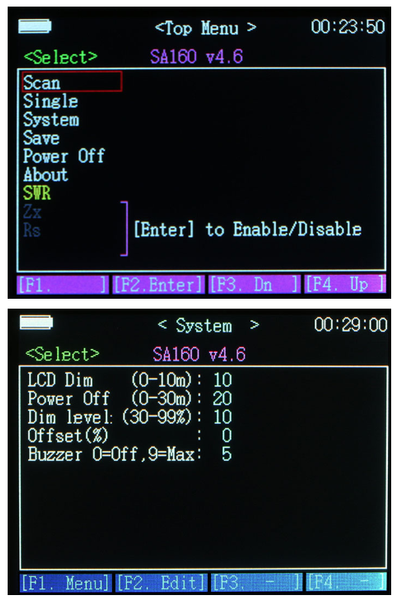
Turn on the power, Press and hold White button when the dot disappear
from left up angle ,. top Menu appeared on the screen.
Turn off the power, You have 2 method :
a)On Top Menu page ,Press and hold the White [F1 ] button at 5 second .
b)On Top Menu page , Rotary encoder on "Power off", Press the [F2 Enter]
Function Select
You can turn the knob select you want function and press [F2.Enter] button
2.0 ANTENNA TEST EXAMPLES by Scan mode
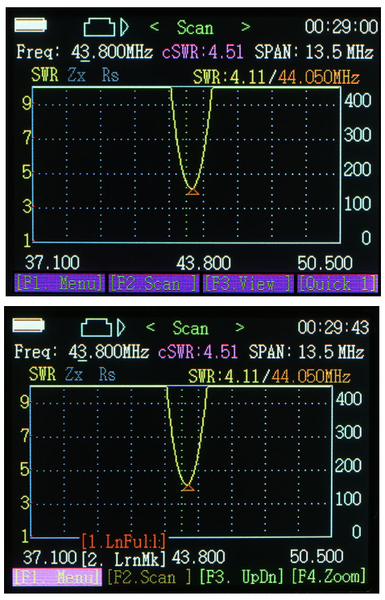
In the Top Menu screen: Rotary encoder on "Scan", Press the [F2 Enter], to frequency mode measurement button, enter Scan (scan mode) screen.
2.1[Scan] mode page
Press [F.2 scan ],button to start the scan operation. During scanning, in order to make sure measurement accuracy, each frequency will stay for short while. one scanning cycle will take about 1-2 seconds.
Once SCAN is done, it will enter ”Present” mode (result) screen
You have results on the screen : Show the SWR curve only (because default setting SWR curve only , Zx curve, Rs curve Disable) You can Enable other curve on the screen:
On Top Menu page, Rotary encoder on "Zx", Press the [F2 Enter] to enable .
Other cure will Disable when Power Off , If want enable in the future, Rotary encoder on "Save", Press the [F2 Enter] to save setting .
2.2 1. lnfull (default SCAN range 0.56MHz -59.9MHz,span 62.1MHz )
* Long press to [SCAN ]and press [F3 UPDn] select "1.Infull",and then release the scan button.
2.lrnMk=(Learn marker move to center frequency)
* Long press to [SCAN ]and press [F3 UPDn] select "2.IrnMk",and then release the scan botton.
2.3 [View]
view the scan frequency point on the curve on each scan of the specific parameters of the measurement results.
- Press the [F3.View ] button to start the view operation mode. rotary encoder ,the white triangle curve marker is move
- Dot scale will display on-screen, Press bottom change the Dot scale,You have 3 options of Dot scale mode for choose,[Dot =x1] [Dot=x10][Dot= x25] . (230KHz,2.3MHz,5.8MHz)
SWR Full scale will display on-screen,Press bottom change the graphically plot SWR,You have 3 options scale mode for choose, [SWR=x2 ][SWR= x 0.5][SWR=x1] .(1-9,1-19,1-4.5)
2.4[ Quick 1] start Scan mode:
Quick view the scan frequency point on the curve on each scan
Press the button [Quick 1 ] to start the Quick 1 operation mode .You have 3 options scan mode for choose .
1)Press the button [F1. Scan 1 ] 0.5 to 27.3MHz can of the specific parameters of the measurement results.
2)Press the button [F2. Scan 2 ] 16.6 to 43.4MHz can of the specific parameters of the measurement results.
3)Press the button[F3. Scan 3 ] 33.6 to 60.0MHz can of the specific parameters of the measurement results.
3.0 ANTENNA TEST EXAMPLES (Single mode):
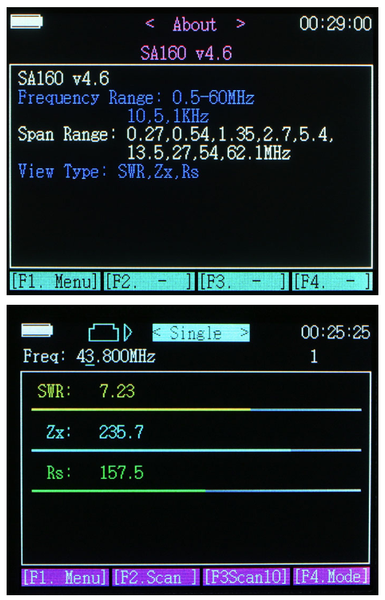
In the Top Menu screen: Rotary encoder on "Single", Press botton "F2" single frequency mode measurement button, enter single (single scan mode) screen.
a, Rotary encoder potentiometer enter the center frequency, the specific reference to the above operation "SCAN" sweep measurement mode descriptions.
b, Press the ”F2 scan", to start the scan for one time .
Single frequency mode provides a single frequency impedance measurement, the measured frequency of the basic parameters have been displayed on the screen. And
to indicate the form of bars and numbers displayed on the screen quickly.
The scanning one time , will stop, until you press the F2 Scan button or rotary encoder potentiometer enter the center frequency.
In this mode, it can be used as an accurate signal generator, please refer to RF out.
PACKAGE CONTAIN:
1 x SURECOM SA160 (ENGLISH VERSION) Colour Graphic Antenna Analyzer
1 x English User"s Manual
1 x Micro Usb Charger Cable
1 x AC Adapter 100-240V (Depends on your country)
Ships within 48 hours · Estimated delivery Oct 27 - Nov 1
US$40
Get nowSign up to your membership to get coupons up to
15%
Get nowOpportunity to enjoy order discount up to 15% off
Top-Converting Item to Boost Your Average Order


